
Hands-On OBDLink MX+ OBD2 Bluetooth Scanner Review: The Good, the Bad, and the Verdict

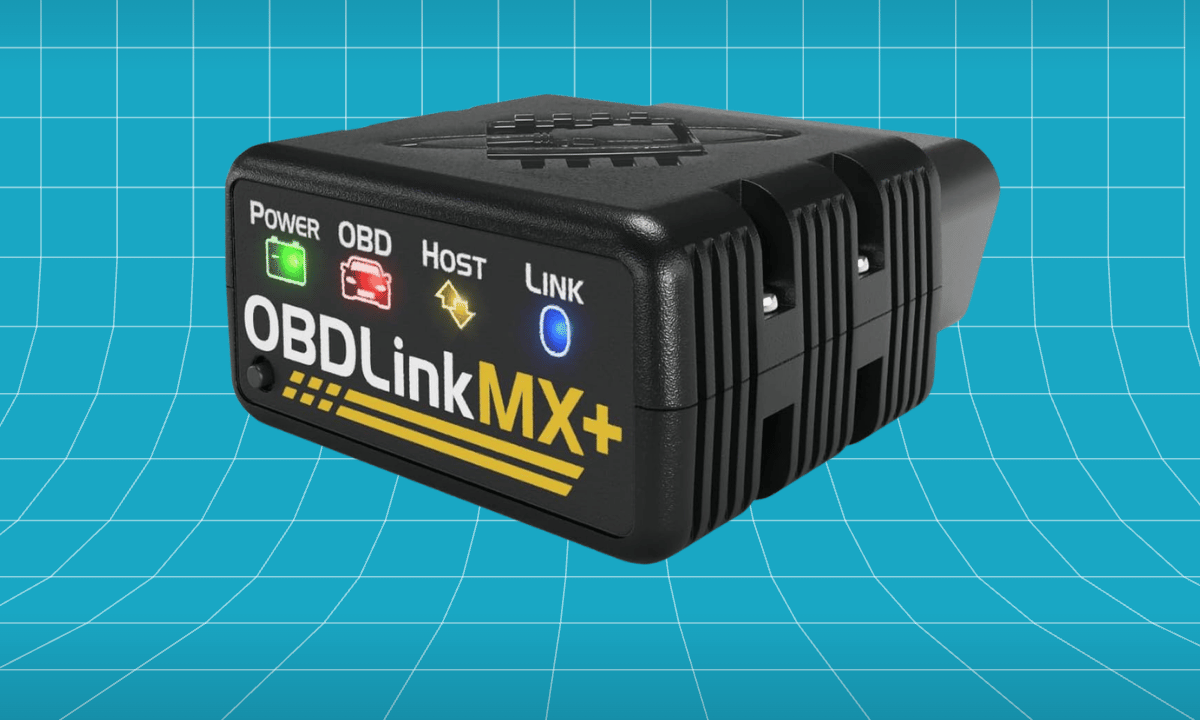
Hands-On OBDLink MX+ OBD2 Bluetooth Scanner Review: The Good, the Bad, and the Verdict

OBDLink MX+ OBD2 Bluetooth Scanner for iPhone, Android, and Windows

Pro-grade Bluetooth adapter unlocking FORScan, BimmerCode and ABS/SRS data through trusted apps.
- Bluetooth adapter reads all OBD2 modes plus ABS/SRS/TPMS via supported apps
- Works with FORScan, Torque Pro, BimmerCode, AlfaOBD and OBDFusion
- Enhanced OEM support for Ford, GM, Toyota, Honda, Nissan, Hyundai and Kia

All systems plus ABS/SRS/TPMS, but only through supported apps.
Needs a phone and third-party app setup to use fully.
$140 adapter; deepest features require paid apps.
We’ve all had that moment – the check-engine light pops up on our dashboard and we’re left wondering what’s going on. A good OBD2 scanner is supposed to help us figure out what’s wrong, and the OBDLink MX+ OBD2 Bluetooth Scanner is often mentioned as one of the best options out there.
I got hands-on with the OBDLink MX+ OBD2 Bluetooth Scanner, testing it out in my driveway and garage to see how it really works.
What It’s Actually Like to Use
The best way to test an OBD2 scanner is when it’s having a tough day, so I began with a check-engine light on, which always gives me that sinking feeling.
The Bluetooth adapter can read all the OBD2 modes, plus it can check the ABS, SRS, and TPMS systems, but only if you’re using the right apps.
I found myself constantly comparing it to my old setup, and it came out on top every time. The fact that it offered so much more value was a major factor in making the upgrade feel like a worthwhile investment – I mean, we’re talking about a $140 adapter, and some of the deepest features require you to pay for apps.
As the days went by, it slowly became a part of everything – from clearing faults after a repair to checking live sensor data during a quick test drive. What made the whole process hassle-free was that it was compatible with a range of tools, including FORScan, Torque Pro, BimmerCode, AlfaOBD, and OBDFusion. This compatibility made it easy to work with, allowing for a seamless experience whether you were troubleshooting issues or just keeping an eye on your vehicle’s performance.
What really keeps it running smoothly is something pretty ordinary, but it’s a big deal: the fact that it’s got solid support from major car makers like Ford, GM, Toyota, Honda, Nissan, Hyundai, and Kia – and it’s just easy to use right out of the box. Having something that’s reliable and doesn’t need a lot of fuss is more important than any fancy feature or spec.
Where it shows its price
One thing that caught my attention was the usability – it requires a phone and a third-party app to be set up to use it to its full potential. While it didn’t hinder my ability to complete the task, it’s something worth considering before making a purchase.
What You’re Actually Getting
The details that matter most come down to three things:
- Bluetooth adapter reads all OBD2 modes plus ABS/SRS/TPMS via supported apps.
- Works with FORScan, Torque Pro, BimmerCode, AlfaOBD and OBDFusion.
- Enhanced OEM support for Ford, GM, Toyota, Honda, Nissan, Hyundai and Kia.
Should You Buy the OBDLink MX+ OBD2 Bluetooth Scanner?
Buy the OBDLink MX+ OBD2 Bluetooth Scanner if:
- You would rather not pay a shop just to scan a light
- You want a sweet-spot balance of price, power, and features
- You want to read and clear check-engine codes yourself
Think twice if:
- You specifically want either the rock-bottom cheapest option or outright flagship performance
- You never intend to do any of your own diagnostics
Final Verdict
The OBDLink MX+ OBD2 Bluetooth Scanner is a solid choice among mid-range OBD2 scanners, and for good reason. Its strongest suit is its diagnostic coverage, which includes all systems, as well as ABS, SRS, and TPMS – although it’s worth noting that this is only accessible through supported apps. On the other hand, its usability is a bit of a letdown, as it requires a phone and third-party app setup to use it to its full potential. When I weighed up all the factors, I gave it a score of around 8 out of 10 for diagnostic coverage, 6 out of 10 for usability, and 6 out of 10 for value. Overall, it’s a good option, but it’s not without its compromises. If you’re looking for a scanner that can handle all your diagnostic needs, the OBDLink MX+ is definitely worth considering – just be aware that you’ll need to put in a bit of extra effort to get it up and running.
Is it worth spending your money on this? I think it’s a good deal, especially considering it’s a mid-range OBD2 scanner – it seems to offer more value than you’d expect for the price you pay.
For most people who regularly deal with a check-engine light glowing on the dash with absolutely no clue what it means, it hits the value sweet spot. If it sounds like the right fit, it’s worth checking today’s price on Amazon.
OBDLink MX+ OBD2 Bluetooth Scanner for iPhone, Android, and Windows
Pro-grade Bluetooth adapter unlocking FORScan, BimmerCode and ABS/SRS data through trusted apps.
- Bluetooth adapter reads all OBD2 modes plus ABS/SRS/TPMS via supported apps
- Works with FORScan, Torque Pro, BimmerCode, AlfaOBD and OBDFusion
- Enhanced OEM support for Ford, GM, Toyota, Honda, Nissan, Hyundai and Kia
All systems plus ABS/SRS/TPMS, but only through supported apps.
Needs a phone and third-party app setup to use fully.
$140 adapter; deepest features require paid apps.
The Bottom Line on the OBDLink MX+
If you want the short version: the OBDLink MX+ is a premium Bluetooth adapter that turns your phone into a serious diagnostic tool, with the strengths and trade-offs covered above. For enthusiasts who want app flexibility and fast, secure reads, the OBDLink MX+ is a standout. For how it compares, see our roundup of the best OBD2 scanners to pick in 2026. And to understand what your trouble codes mean for emissions, the guidance from the EPA is a helpful reference.
Related reviews
EGO POWER+ String Trimmer Review: Does This String Trimmer Live Up to the Hype?
EGO POWER+ String Trimmer Review: Does This String Trimmer Live Up to the Hype? You’re standing there, watching the grass…
BLACK+DECKER 20V MAX POWERCONNECT Cordless Drill Review: Does This Cordless Drill Live Up to the Hype?
BLACK+DECKER 20V MAX POWERCONNECT Cordless Drill Review: Does This Cordless Drill Live Up to the Hype? There’s nothing more frustrating…
BLACK+DECKER 12V MAX Cordless Drill/Driver Review: Does This Cordless Drill Live Up to the Hype?
BLACK+DECKER 12V MAX Cordless Drill/Driver Review: Does This Cordless Drill Live Up to the Hype? Using a drill that’s tired…